

Saving locally
With Snapshots, you can save the state of your LocalStack instance to a local file on disk, then load it back at a later time. This concept is similar to desktop-based word processors, spreadsheets, or practically any software that allows saving and loading the program state.
In addition, LocalStack’s snapshot mechanism allows for loading multiple snapshot files into the same emulator instance, useful when multiple teams collaborate to build a running emulator image.
Using the lstk CLI
Section titled “Using the lstk CLI”The lstk CLI lets you save your instance’s state to a local file and load it back into another instance at a later time.
To save the state to a local file, run:
lstk snapshot save my-snapshot✔︎ Snapshot saved to ./my-snapshot.snapshotThe destination argument is optional.
If you omit it, lstk auto-generates a timestamped snapshot file in the current directory:
lstk snapshot save✔︎ Snapshot saved to ./snapshot-2026-07-19T22-20-46-31f.snapshotSince saving is a common operation, the lstk save abbreviation is allowed:
lstk save✔︎ Snapshot saved to ./snapshot-2026-07-19T22-27-20-16e.snapshotTo load a previously saved snapshot, run:
lstk snapshot load my-snapshot✔︎ Snapshot loaded from ./my-snapshot.snapshotOr alternatively, the lstk load command is allowed:
lstk load my-snapshot✔︎ Snapshot loaded from ./my-snapshot.snapshotSnapshot Merging
Section titled “Snapshot Merging”A common use case is when snapshots created by multiple teams must be loaded together into the same LocalStack instance. For example, a Platform team may create a snapshot containing VPCs, Subnets, S3 buckets, and SSM parameters. An Application team then produces their own snapshot (building on the first) that contains Lambda functions, S3 buckets, ECS images, and other application-level resources. It’s therefore important to load multiple snapshots, one on top of the other.
LocalStack supports several merge strategies to support loading a snapshot into an existing emulator instance. You can think of this as loading two or more snapshots into the same emulator instance, one after the other.
overwrite strategy
Section titled “overwrite strategy”This strategy completely resets the state of the instance before loading each new snapshot. This results in the instance containing the new snapshot’s content, with resources from the older snapshot being completely discarded.
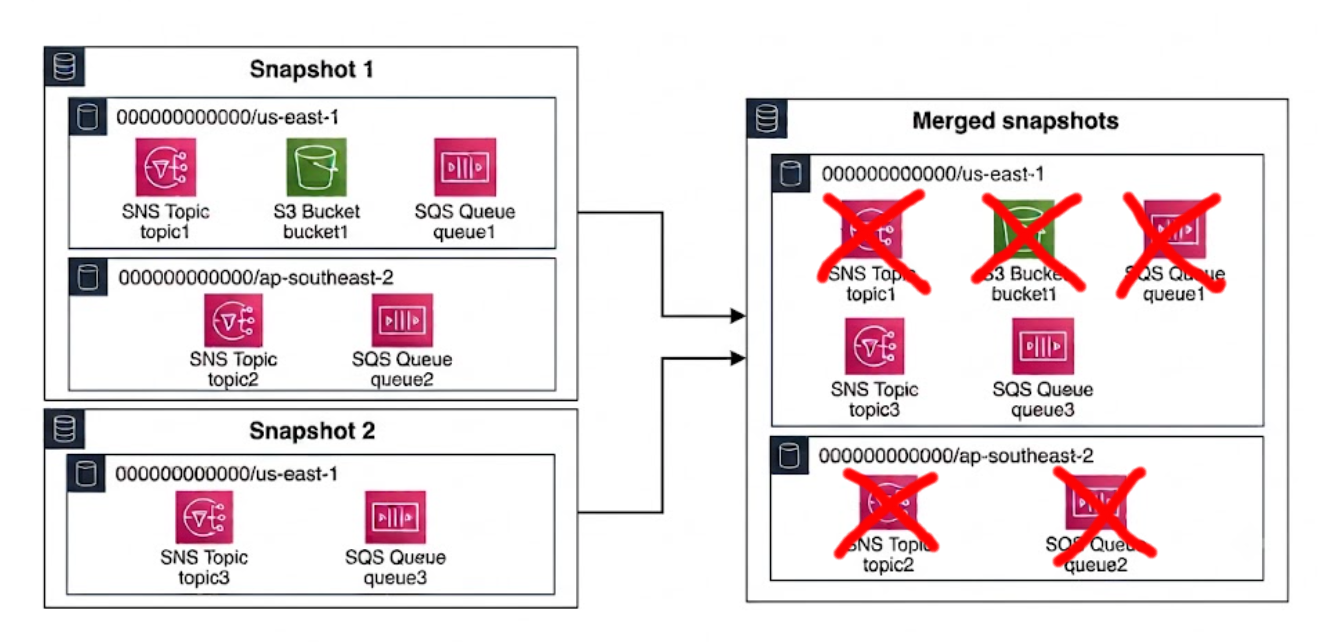
For this merge strategy, use the following:
lstk snapshot load snapshot1.snapshotlstk snapshot load --merge=overwrite snapshot2.snapshot
lstk status  [...]  SNS      topic3                                                                     us-east-1  000000000000  SQS      http://sqs.us-east-1.localhost.localstack.cloud:4566/000000000000/queue-3  us-east-1  000000000000
account-region-merge strategy (default)
Section titled “account-region-merge strategy (default)”Merge snapshots at the service level, for any given account and region. For example, if the first snapshot contains an SQS queue (queue-1) in the 000000000000/us-east-1 region, and the second snapshot contains a different SQS queue (queue-3), also in the 000000000000/us-east-1region, the first snapshot’s SQS resources are discarded. This strategy does not consider whether that the SQS queues have different names, since all SQS resources in that region are discarded.
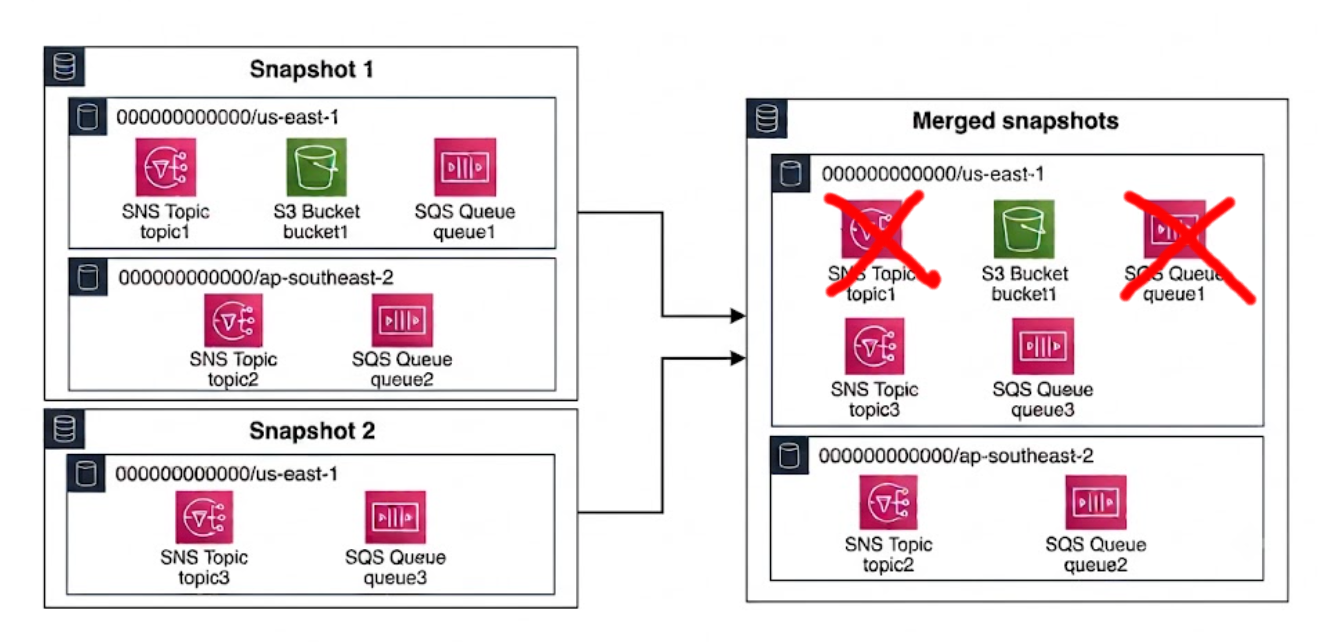
For this merge strategy, use the following:
lstk snapshot load snapshot1.snapshotlstk snapshot load --merge=account-region-merge snapshot2.snapshotTBD: THE OUTPUT FROM ACCOUNT_REGION_MERGE IS NOT CORRECT YET.
service-merge strategy
Section titled “service-merge strategy”This strategy performs fine-grained merging, similar to the account-region-merge strategy, but also considers the names of resources. For example, if each snapshot contains an SQS queue, but the queues have different names (queue-1 vs queue-3), the merge contains both queues. If the names are the same, the resource from the newer snapshot is kept.
This is the same behaviour you’d expect if you applied two infrastructure-as-code stacks, one on top of the other.
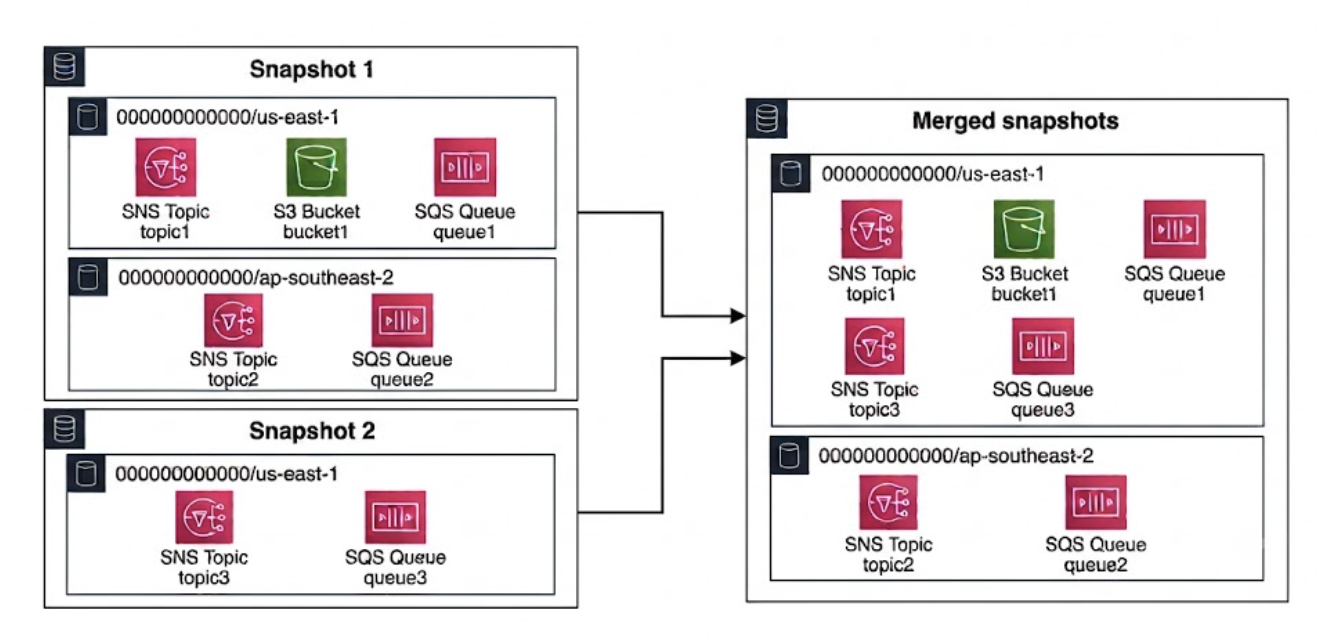
For this merge strategy, use the following:
lstk snapshot load snapshot1.snapshotlstk snapshot load --merge=service-merge snapshot2.snapshot
lstk status  [...]  S3       bucket1                                                                         global          000000000000  SNS      topic1                                                                          us-east-1       000000000000  SNS      topic2                                                                          ap-southeast-2  000000000000  SNS      topic3                                                                          us-east-1       000000000000  SQS      http://sqs.ap-southeast-2.localhost.localstack.cloud:4566/000000000000/queue-2  ap-southeast-2  000000000000  SQS      http://sqs.us-east-1.localhost.localstack.cloud:4566/000000000000/queue-1       us-east-1       000000000000  SQS      http://sqs.us-east-1.localhost.localstack.cloud:4566/000000000000/queue-3       us-east-1       000000000000
Using the LocalStack Console
Section titled “Using the LocalStack Console”The LocalStack Console allows saving a snapshot to a file, then loading it into another LocalStack instance.
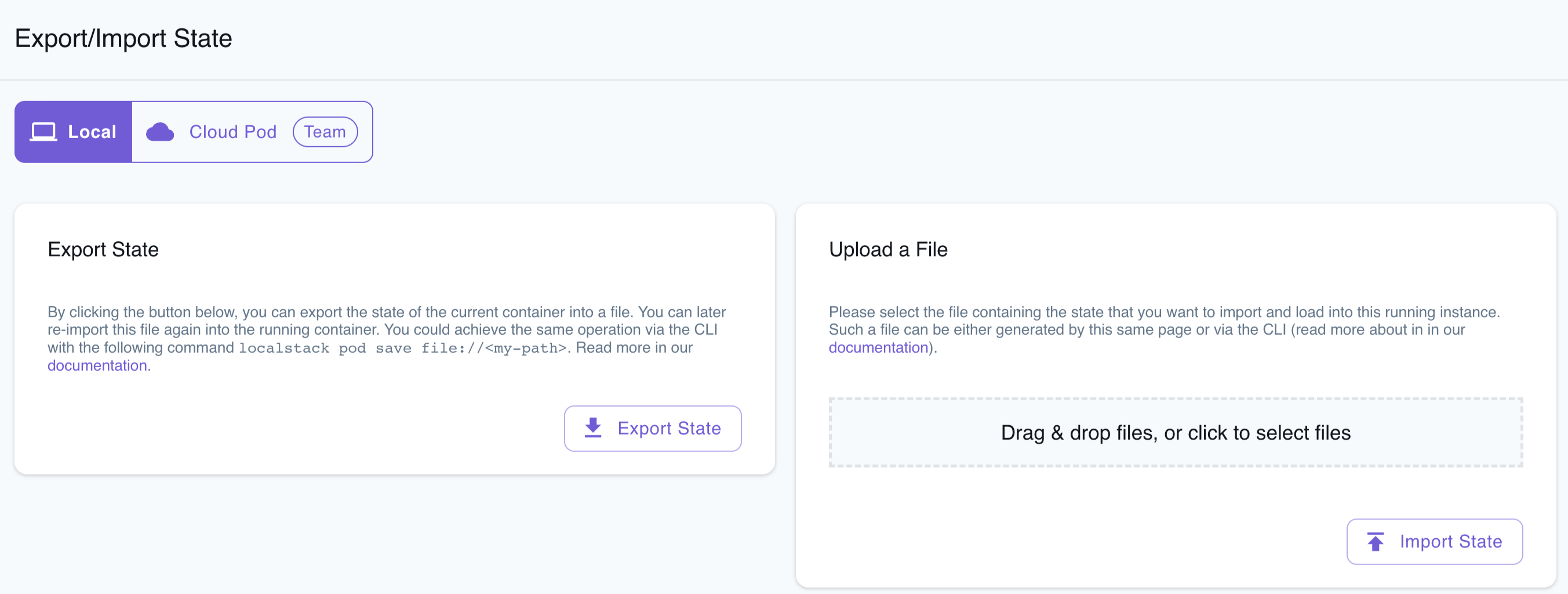
To save the snapshot, follow these steps:
- Create AWS resources locally as needed.
- Navigate to the Local tab within the Export/Import State page.
- Click on the Export State button. This action will initiate the download of a ZIP file.
The downloaded ZIP file contains your container state, which can be injected into another LocalStack instance for further use.
To load an existing snapshot, follow these steps:
- Navigate to the Local tab within the Export/Import State page.
- Upload the ZIP file that contains your container state. This action will restore your previously loaded AWS resources.
To confirm the successful injection of the container state, visit the respective Resource Browser for the services and verify the resources.